
Android build
99Exch APK — Free Android Install, Sideload Steps and a Share Link for Friends
To install the 99Exch APK, open a working mirror such as 99exch.red, tap Download .apk under the sign-in form, let your browser install unknown apps once, then open the file and sign in with the 99Exch ID you already use. From first tap to lobby it takes roughly two minutes.
Where the Free 99Exch Download .apk Link Sits on Each Live Mirror
Nobody hunts through an app store for this file. Each mirror hands out the 99Exch APK from its own sign-in screen, so the first job is simply getting one of those addresses to load. We opened each of them on 5 Oct 2026 and noted exactly where the download sits.
- 99exch.red
- Ignore the form at first and scroll. Right after the dividing line that ends the sign-in block, the APK button heads a stack of three; the WhatsApp contact button and the share button come under it. On a big phone all of it fits on one screen, on a small one it does not.
- 99exch.live
- Identical arrangement. Same two fields, same pair of login buttons, the same three-button stack underneath.
- 99exch.green
- Again the full stack. If .red is slow on your network this is usually the next one people try, and the 99Exch download behaves the same way from here.
- 99exch.win
- The sign-in form is there, but under it you get Download .apk and nothing else: no WhatsApp button and no share button. Fine for installing on your own phone. Less handy if a friend asked you for the file.
- 99exch.com
- This one skips the sign-in screen and opens the full exchange lobby with cricket, football, kabaddi and the casino list. A popup offering the APK download shows up as the page opens, so you can grab the file before you even reach the odds grid.
Why five addresses for one 99Exch account? Indian ISPs block betting domains on and off, and when one address goes dark another takes over. Your ID and balance stay the same on every one of them, which is exactly why the APK can come from any working mirror without changing anything on your account. If you want the backstory on the address that most often loads first, the 99Exch Green mirror notes cover it, and the 99Exch Live address page covers its twin.
A 99Exch quirk from our 5 Oct check: on .red, .live and .green the three buttons sat lower on the page than the form, and on a compact handset they start off-screen. Missing button? Usually just not scrolled to yet.
When the 99Exch mirror loads but Download .apk seems to do nothing
Pull down the notification shade first. Quite often the download started fine and the only feedback was a small arrow in the status bar, wich is easy to miss while you are staring at the page. If nothing is there, look at how you opened the mirror. Links tapped inside WhatsApp or Telegram open in those apps' built-in browsers, and some of them handle file downloads badly or not at all; use the three-dot menu to open the same page in Chrome and tap the button again.
Data saver modes and aggressive ad blockers can also swallow the request. Turning them off for a minute is enough. Then turn them back on, if you like them.
And if the address itself will not load, that is a block on the address, not a fault in the 99Exch download. Try the next mirror on the list above rather then refreshing the same one twenty times.
Easy 99Exch APK Install in Four Moves, Roughly Two Minutes
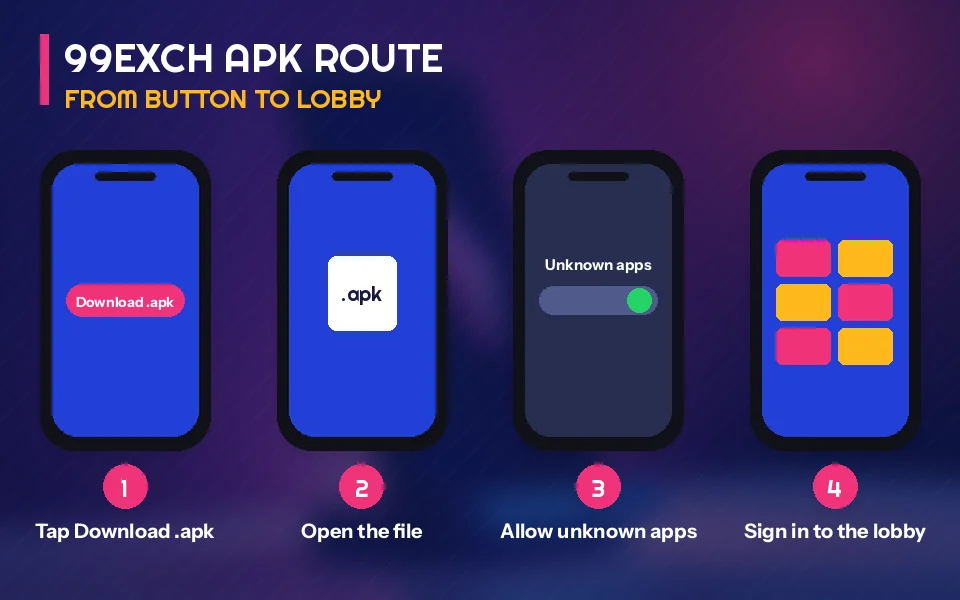
Android treats any file that does not come from the Play Store as a sideload. That is the only reason the 99Exch APK needs an extra permission, and you give it one time.
- Download. On a working mirror, tap Download .apk. Chrome may warn that this type of file can harm your device and ask whether to keep it; choose Download or Keep. Your Downloads folder gets the file, and a small notification appears once it finishes.
- Allow install unknown apps, once. The first time you open a sideloaded file, Android pauses with a security notice and a Settings link. That switch is tied to whichever app opened the 99Exch file (Chrome, Samsung Internet, the Files app). Flip it, press back. No need to fetch the file again.
- Open and install. Next comes the installer screen, carrying the 99Exch name and an Install button. Tap it. Google Play Protect may step in with a scan message here; the table further down says what each of those messages means.
- Sign in. Open the new icon and type the User Name and Password you already use on the mirror. Nothing about your 99Exch ID changes because you switched from browser to app.
Two minutes is the realistic figure, not a best case. The download itself is the the quick part. Most of the time goes on the permission screen, because people read it twice, and that is fair enough the first time you see it.
About the keep-or-discard question in step one: Chrome asks it of any .apk from any website, 99Exch included. It is a question about origin. Tapped the mirror button yourself a few seconds ago? Then you already know the origin. A file of uncertain history is another story, and the fixes table has a row for it.
Picture a fairly normal evening. Someone in Nagpur taps Download .apk three times because nothing seemed to happen, ends up with three copies in Downloads, opens the one marked (2) while it is still half-written and gets a parsing error. Deleting all three and downloading once, then waiting for the notification, sorts it in under a minute.
Step four assumes you already have an account. If you do not, stop after the install; the icon can sit on your home screen for a day. Request a user name through the 99Exch sign-up route with the desk, and if a password gets refused later, the 99Exch login page covers that case.
Second prompt after tapping the 99Exch download in Files
Went looking for the file in Files rather than tapping the browser notification? Expect the switch to appear a second time, now with Files named on it. Annoying, harmless. One more tap and the 99Exch installer is up.
Where the unknown apps switch hides on Samsung, Xiaomi and other phones
The prompt during install is the easy way in, and it works on nearly every phone. If you dismissed it by accident, the switch still exists, just buried. On most Samsung phones it lives under Settings, Apps, then a menu for special access, then Install unknown apps. Xiaomi, Redmi and Poco phones tend to keep it under privacy or special permissions, and some of them run an extra scan of their own on the 99Exch file before the normal installer shows. Stock Android phones such as Pixel and Motorola put it under Apps, Special app access. Labels shift a little between releases. What you are looking for is always the same: the app that opened the file, with Allow from this source switched on.
Some people turn the switch off again straight after the 99Exch icon appears. That is fine; it does not uninstall anything. Expect the same prompt to come back the next time you install a fresh build over the top.
And if you are moving to a new handset, the whole routine repeats on that phone: download, allow, install, sign in. Your account was never stored on the old device in the first place, so there is nothing to copy across.
People also search
Quick 99Exch Link for a Friend Instead of a Forwarded File
Every match night somebody in the group asks for the app. You could forward the file itself, but the mirror already has a button for exactly this.
Share This Apk to Friend is the last of the three buttons on 99exch.red, 99exch.live and 99exch.green. Tapping it should bring up Android's normal sharing options, so the link can go out over WhatsApp, Telegram or whatever your group actually uses. The point of sending a link instead of the file: your friend downloads a fresh 99Exch copy from the mirror, rather than something that has been forwarded four times and renamed along the way. Neither .win nor .com carries this button (.com works through its popup instead), so if you want to share, open one of the other three.
What your friend gets is the installer and nothing more. The 99Exch APK carries no account inside it, so they will need their own ID before step four makes any sense; sharing yours is a bad idea for reasons that hardly need spelling out. They follow the same four moves: download, the one-time unknown apps switch, install, sign in. If their phone refuses the file, the fixes below apply to them just as much as to you. (And yes, they will probably ask you anyway.)
On 99exch.win, which has no share button, the simplest move is to open .red or .green and share from there. Copying the address bar works too, though then your friend lands on the sign-in screen and has to find Download .apk themselves, which takes a few seconds of scrolling on a small phone.
One practical note. When the 99Exch link arrives on WhatsApp and your friend taps it, it opens in WhatsApp's own browser or in Chrome, depending on their settings. Whichever opens the download is the app that needs the unknown apps permission. Same rule as before, just on someone else's phone.
99Exch APK Search Terms Matched to Clear, Working Answers
What a 99 exchange apk search is really after on an Android phone
Whether someone types 99exch apk, 99 exchange apk or 99exch download, they want the same thing: an installable Android file that opens straight into their 99Exch account. On this page that file comes from the Download .apk button on a live mirror and nowhere else.
People who add app to the search, as in 99exch app download apk, are usually comparing the installed build with the browser. That comparison belongs to the 99Exch App page; here we stay with the file.
- 99exch apk: the Android installer from the mirror sign-in screen, set up in about two minutes
- 99exch app download apk: same file, reached from any of the four mirrors that show the button
- 99exch download: the Download .apk button itself, under Login with Demo ID
- 99exch app download apk latest version: there is no update screen inside the 99Exch build, so the newest copy is simply the next tap on the mirror button
Which address answers a 99exch com apk search as of 5 Oct 2026
Searching 99exch com apk usually means someone saw the popup on 99exch.com. Below, each address is matched to how it hands out the 99Exch file on the day we checked.
| Address | How the APK is offered |
|---|---|
| 99exch.com | Download popup when the lobby opens |
| 99exch.red, .live, .green | Download .apk button plus Share This Apk to Friend |
| 99exch.win | Download .apk button only |
Fast Fixes When the 99Exch APK Refuses to Install
Seven rows. Each starts from what is actually printed on the phone when the 99Exch file misbehaves, and the right-hand column is the thing to tap or delete.
Before you close any error, take a screenshot. Wording matters: a parse error and an App not installed message look similar at a glance and have different fixes, and if you end up asking the 99Exch desk on WhatsApp, the screenshot answers their first question for them.
| What the phone says | Likely cause | What to do |
|---|---|---|
| A security notice that blocks the source with a Settings link | The one-time switch from step two is still off | Follow the Settings link, flip the switch, come back; the 99Exch file is still waiting, no second download |
| Blocked by Play Protect, or an unsafe app warning | Play Protect scans every file that did not come from the Play Store | If the file came from Download .apk on a working 99Exch mirror, open More details and choose Install anyway. If a stranger forwarded it, delete it and download your own |
| There was a problem parsing the package | The download stopped part-way, or the file was renamed or corrupted in forwarding | Delete every copy in Downloads, fetch once from the mirror, wait for the finished notification before you tap it |
| App not installed | An older 99Exch build is already on the phone and Android will not lay the new one over it | Uninstall the old icon, then install the new file. Your ID and balance are untouched |
| Installs, but opens to a blank or endlessly loading screen | Probably the network is blocking the address the build points at | Give the other connection type a go for a minute; if the 99Exch app stays blank, sign in on whichever mirror Chrome can reach |
| Not enough storage, or the install bar stalls near the end | The phone is almost full | Clear a little space, delete old installer copies from Downloads, then try once more |
| Download finished but the file is nowhere to be found | It saved to a folder you did not expect | Open the Files app, go to Downloads, sort by newest |
The Play Protect row deserves a second look, because that warning is where most people stop. It appears for the 99Exch APK for the same reason it appears for any sideloaded file: Google did not distribute it. That is all the warning knows. What matters is where your copy came from, and a copy you pulled yourself from the Download .apk button is a very different thing from a file of unknown origin that turned up in a group chat. Same point, put another way: trust the source, not the filename.
Still stuck after all that? Our 99Exch App comparison explains how the browser route works if you would rather skip installing for now, and the desk on WhatsApp can look at a screenshot of whatever message your phone is showing.
Keeping the 99Exch APK on the latest build
We do not print a version number on this page, because the only reliable latest version is whatever the Download .apk button serves on the day you tap it. To update, download again from a working mirror and install over the top. If Android answers with App not installed, uninstall the old icon first and then install; nothing on your 99Exch account depends on the copy on your phone. A Play Store listing called MY 99 EXCH also turns up when people search 99 exchange. We have not tested it, and everything here is about the file from the mirror.
Tidying up after the 99Exch install
The downloaded file is only an installer. Once the 99Exch icon is on your home screen, the copy in Downloads can go; deleting it does not remove the app. Keep it only if you plan to install on a second phone without an internet connection, which is rare. Mostly people forget it is there until three versions have piled up, and that pile is exactly what causes the wrong-file mistake from the Nagpur example earlier.
Older copies floating around on file-sharing sites are the ones to avoid. Their age is the problem, more than anything else: an old build may point at an address that has since been blocked, which looks exactly like the blank-screen row in the table. Fresh download, fresh install. That fixes more than people expect.
99Exch APK Questions With Straight, Safe Answers
How do I download the 99Exch APK?
Open a working mirror such as 99exch.red, 99exch.live or 99exch.green, scroll below the sign-in buttons and tap Download .apk. Keep the file when Chrome asks, allow your browser to install unknown apps once, tap Install, then sign in with your usual 99Exch user name and password.
Is the 99Exch APK safe to install?
The copy from the Download .apk button on a working 99Exch mirror is the one this page covers, and that is the copy to install. Android warns about it only because it did not come from the Play Store. Files forwarded by strangers or old copies from download sites are the ones to delete.
Why does my phone say App not installed or show a parse error?
Two different problems. The parse message points to a half-finished or renamed 99Exch file, so clear Downloads and fetch a single fresh copy. App not installed points to an old build blocking the new one; remove the old icon first. Neither touches your ID or balance.
Where do I get the latest version of the 99Exch APK?
The latest version is whatever the Download .apk button on a live 99Exch mirror serves today. Download it again and install over your current copy. If Android refuses, remove the old app first and then install. Nothing on your account is lost, because it lives with your ID, not the phone.
Does the 99Exch APK work on iPhone?
No. Tapping Download .apk on an iPhone just saves a file iOS has no way to run. iPhone owners load a working 99Exch mirror such as 99exch.red in Safari and sign in on that screen with the same user name and password Android players use.