
Password reset
99Exch Login Password — Quick Reset Through the WhatsApp Desk in About 5 Minutes
To reset a forgotten 99Exch login password, message the Password Issue desk on WhatsApp with your user name and registered mobile. A temporary password usually comes back in about 5 minutes. Sign in with it, set a password of your own during that same sign-in, and carry on with the same 99Exch ID.
Fast 99Exch Login Password Reset on WhatsApp, Message by Message
Most resets are short. Below is a typical exchange with the 99Exch Password Issue desk, trimmed a little (real chats have more "ok" and "wait" in them). The masked digits stand in for your own details.
Hi, Password Issue. Forgot my 99Exch password, can't sign in. User name is the one I always use, mobile ending 4417.
Got it. Please confirm the full mobile number registered on that 99Exch ID.
98xxxx4417
4417 is on file for that user name. Your temporary one is in the next bubble.
Temp: ••••••••
In. Changed it. Thanks.
Roughly five minutes from first message to the temporary password is the normal pace. On a packed match night it can stretch a bit; hard to say by how much, since it depends on the queue at that desk.
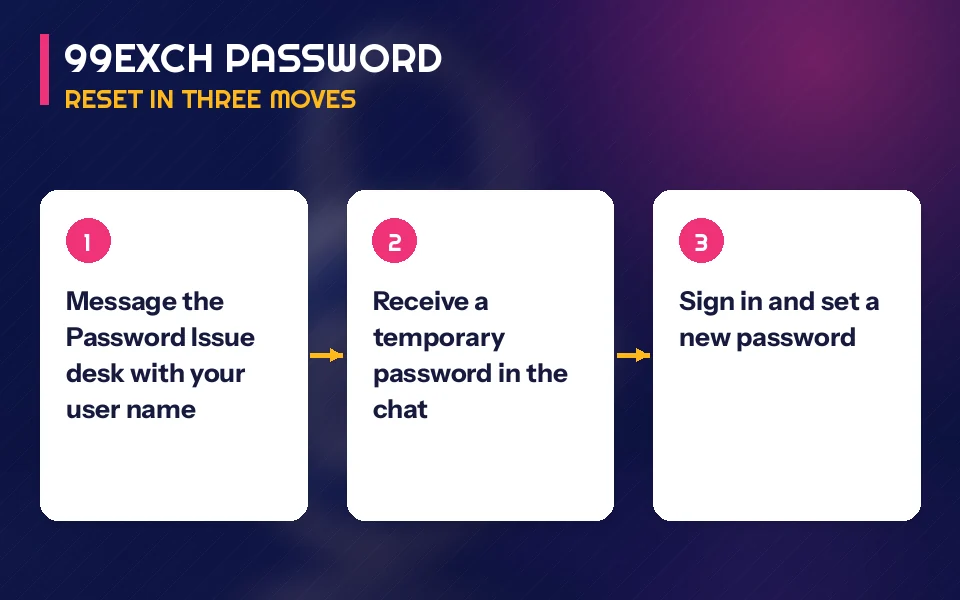
The four steps, in the order the 99Exch desk runs them
- Tap Password Issue in the 99Exch chat. It sits next to New ID, Deposit Issue and Withdrawal, and it is the only one of the four that resets anything. Put your user name and the account mobile in a single message.
- Wait for the temporary password. About 5 minutes is typical. Do not send the request again in the meantime, a second message just joins the same queue.
- Sign in on the usual 99Exch screen. User Name in the first box, the temporary password in the Password box, then Login. Copy it exactly as sent.
- Set your own password straight away. The temporary one is only for getting back in. Pick something you will remember and that nobody else knows.
That is the theory, anyway. In practice the step people trip over is the first one. A regular told us he messaged the Deposit Issue desk between overs, waited, got a polite reply asking what deposit he meant, and only then switched to Password Issue: the reset itself took a few minutes once it reached the right place. Picking the desk is two seconds of attention that saves you the round trip.
Two more things. The New ID desk opens fresh accounts; it can't bring back an old password, so asking there may leave you with a second ID instead of your old balance. And if you never had a password at all, the ID was set up for you and the temporary one got lost before first use, it is the same Password Issue route. Steps for the first-time setup sit on the 99Exch new ID page, and the regular sign-in screen is covered on the 99Exch login page.
People also search
Clear 99Exch Login Password Terms, Tied to This Reset Flow
Where the 99exch login password query meets the Password Issue chat
Type 99exch login password into a search bar and you are, almost certainly, sitting on a 99Exch sign-in screen that keeps refusing you. No email field exists on that screen to send a link to. The way back is a chat: Password Issue desk, temporary password inside about 5 minutes, your own password chosen at the next sign-in. Each search phrase below maps to one moment in that chat.
| Phrase people type | Where it lands in the 99Exch reset |
|---|---|
| 99exch login password | The second box on the sign-in screen, under User Name |
| 99exch forgot password | Message the Password Issue desk with user name and mobile |
| 99exch temporary password | Arrives as its own chat bubble from Password Issue, about 5 minutes after you write |
| 99exch password change | Done by you during the first sign-in with the temporary password |
Why searchers add com to the 99exch com login password query
The extra word is usually just the address people remember typing. The 99exch com login password is the same password as on any working 99Exch address: one ID, one password, whichever sign-in screen loads for you. Resetting it once covers all of them.
- Check the user name first, letter by letter, before blaming the password.
- If the password still fails, message Password Issue rather than retrying again and again.
- Sign in with the temporary password and replace it during that same visit.
Saving the desk contact before the next lockout helps; the 99Exch WhatsApp number page lists it in full.
Safe 99Exch com Login Password Rules — Temporary vs Your Own
Once the desk replies, a handful of small habits decide whether you are in on the first try or back in the chat. These apply to the 99Exch password on every address, the .com one included.
- First letter
- Your keyboard may put a capital at the start of the Password box on its own. If the 99Exch code began with a small letter, that one auto-correction is enough for a refusal, so glance at character one.
- Long-press copy
- Long-pressing the bubble in WhatsApp often grabs a trailing space or the word Temp along with the 99Exch code. Paste into a notes app first if a pasted password keeps bouncing.
- Desk-issued code
- A stopgap from 99Exch, nothing more. Leaving it in place for a week because the match started is common; swap it during that very sign-in rather then later, while the chat is still open.
- Your own password
- Chosen by you, known only to you. The desk does not need it to help with deposits, withdrawals or anything else on your 99Exch ID.
- Captcha prompt
- The sign-in screen on the working addresses carries a reCAPTCHA note. Finish that check before pressing Login, otherwise the attempt does not go through no matter what the password is.
- Demo button
- Pressing Login with Demo ID while the reset is pending gets you practice chips to click around with. Fine for killing five minutes. It will not show your 99Exch balance, so nobody should read it as the reset having worked.
A worked example, with made-up clock times. You write to Password Issue at 9:40 pm, second innings under way. Around 9:45 the temporary password lands. By 9:47 you have typed it in, picked a new one, and the 99Exch lobby is open again with the same ID and the same bets you left. Seven minutes, give or take, and most of it was waiting for one reply.
Count what travels in the 99Exch reset chat: your user name and mobile go out, one temporary code comes in. Your new password never appears in that list. A stranger in a Telegram group, a DM or a phone call who says Password Issue and asks what you just chose is outside the reset by definition, whatever name they use. Keep that password off every chat.
Lost track of which page does what? My99Exch covers the account area you land in after signing in, where your balance and bets sit.
99Exch Login Password Questions — Quick Answers
I forgot my 99Exch login password. What should I do?
Message the Password Issue desk on the 99Exch WhatsApp chat with your user name and the mobile number registered on the ID. The desk checks the details and sends a temporary password, usually in about 5 minutes. Sign in with it, then set a password of your own during that same sign-in.
How long does a 99Exch password reset take?
Usually about 5 minutes from your first message to the temporary password arriving. It can run longer when the Password Issue desk is busy, such as during a big match. Sending the request twice does not speed it up, so send once with your user name and registered mobile and wait for the reply.
How do I change my 99Exch com login password?
Your first sign-in after the reset is where the change happens: enter the temporary code from the 99Exch Password Issue desk, then choose your own. People search the .com form because that is the address they remember, but one password covers every working 99Exch address, so a single change is enough.
Can I reset my 99Exch password without WhatsApp?
Not through any other channel on the sign-in screen. The 99Exch screen offers Contact On WhatsApp and no email reset field, so the Password Issue desk on WhatsApp is the route. If the app is missing, install WhatsApp on the mobile number registered to your 99Exch ID first, then write to the desk.
What if my 99Exch account is locked after wrong password tries?
Write to the 99Exch Password Issue desk instead of guessing a fifth or sixth time. Give the user name and the mobile on the account; the desk replies with a temporary code that replaces whatever you were trying. Sign in with that once, choose a password you will remember, and the lockout question goes away.